
FreshBooks plans offer – lite, plus, premium, and select, with a 30-day free trial and get 90% off for 4 months, making it easy to choose the right fit.
FreshBooks Plans Overview (April 2026)
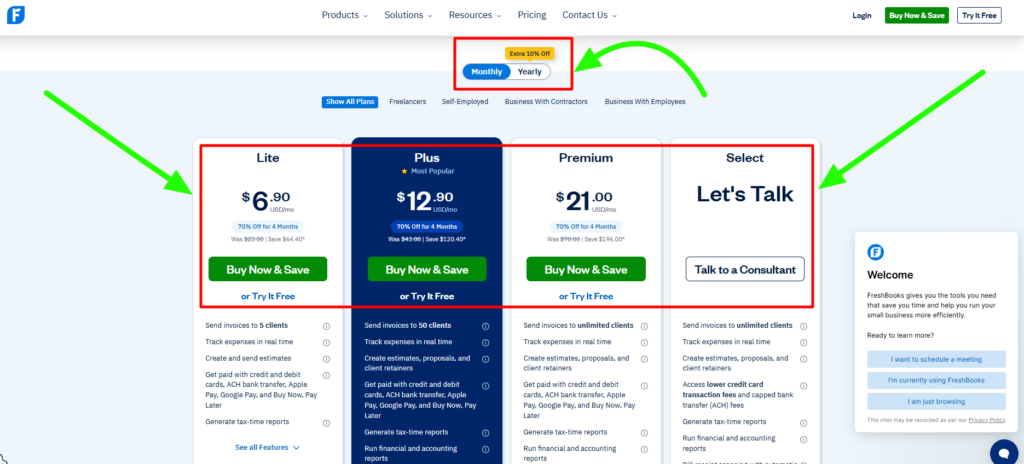
Here’s a breakdown in table form to help you choose the right plan.
| Plan | Monthly Price | Annual Price | Promo Price (Limited) | Clients | Best For |
|---|---|---|---|---|---|
| Lite | $23/month | $20.70/month | ~$2.30/mo (90% off, 4 mo) | Up to 5 | Freelancers with basic invoicing needs |
| Plus Popular | $43/month | $38.70/month | ~$4.30/mo (90% off, 4 mo) | Up to 50 | Growing businesses needing automation & reports |
| Premium | $70/month | $63/month | ~$7.00/mo (90% off, 4 mo) | Unlimited | Scaling teams with high client volume |
| Select | Custom | Custom | Custom | Unlimited | Large businesses needing custom setup & support |
Before choosing a plan, you can explore FreshBooks discounts for the latest offers.
Let’s break down each FreshBooks plan and understand what you get with each option.
FreshBooks Lite Plan – $23/month
The Lite plan covers the essentials you need to run a small business.
It’s ideal if your workflow is simple and you mainly need invoicing, expense tracking, and basic client management without advanced accounting tools.
What’s included:
- Basic project management
- Unlimited invoices (up to 5 clients)
- Expense tracking with bank/card imports
- Estimates and proposals
- Time tracking with a timer
- Recurring invoices
- Custom invoice templates with branding
- Client portal for viewing and paying invoices
- Accept payments (cards, ACH, Apple Pay, Google Pay, BNPL)
Who Should Choose FreshBooks Lite?
Choose Lite if you’re a freelancer or side-business owner with a small, steady client base and simple invoicing needs.
It’s also a good starting point if you’re testing accounting software.
Skip Lite if you need more than 5 clients, accountant access, or advanced accounting features—Plus is a better fit for scaling.
FreshBooks Plus Plan – $43/month
The Plus plan is the most popular option, adding automation and full accounting tools to help you scale.
It’s ideal if you manage multiple clients and want less manual work with better financial accuracy.
What’s included:
- Everything in Lite + up to 50 clients
- Double-entry accounting
- Bank reconciliation
- Profit & loss, balance sheet, cash flow reports
- Automatic payment reminders and late fees
- Client retainers
- eSignatures for proposals
- Automated receipt capture
- Accountant access
- Advanced project tracking
Who Should Choose FreshBooks Plus?
Choose Plus if you manage multiple clients, need recurring billing or retainers, and want easy accountant access at tax time.
Upgrade to Premium if you exceed 50 clients, need deeper project tracking, or want to remove FreshBooks branding.
FreshBooks Premium Plan – $70/month
The Premium plan removes client limits and adds deeper insights like project profitability.
It’s ideal if you handle high client volume or want to track which projects bring the most revenue.
What’s included:
- Everything in Plus + unlimited clients
- Project profitability tracking
- Custom email templates and branding removal
- Accounts payable tracking
- Advanced business reports
- Up to 500 GB storage
Who Should Choose FreshBooks Premium?
Choose Premium if you manage 50+ clients, run multiple projects, need profitability insights, or want full control over client-facing branding.
Consider Select if you process high payment volumes, want lower transaction fees, or need dedicated support and onboarding.
FreshBooks Select Plan – Custom Pricing
The Select plan is a custom, quote-based option designed for large operations.
It focuses on better pricing terms, lower fees, and hands-on support rather than new core features.
What’s included:
- Everything in Premium
- Lower credit card processing fees
- Capped ACH transfer fees
- 2 team members included
- Dedicated account manager
- Priority support line
- Data migration from other tools
Who Should Choose The FreshBooks Select Plan?
Choose Select if you process high monthly payments (around $50K+), want lower transaction fees, need help migrating from tools like QuickBooks, or require dedicated support for larger teams and operations.
If you’re planning to use FreshBooks, you can also turn it into an earning opportunity. Instead of just using the tool, you can join the FreshBooks affiliate program and earn commissions by referring these plans to others.
FreshBooks Plan Add-Ons Extra Costs
All FreshBooks plans support the following paid add-ons. Factor these into your total cost when comparing plans.
| Add-On | Price | Available On | What It Adds |
|---|---|---|---|
| Additional Team Members | $11/user/month | All plans | Each extra user seat beyond the included count |
| Advanced Payments | $20/month | Lite, Plus, Premium (included on Select) | Virtual terminal, subscription billing, secure card storage, checkout links |
| FreshBooks Payroll (via Gusto) | $40/mo + $6/employee | All plans | Full payroll processing, direct deposit, auto tax filing (US only) |
How to Claim Your FreshBooks Plan Discount?
Redeeming the 90% off FreshBooks offer takes less than two minutes. Here’s how to do it:
Visit the official FreshBooks pricing page.
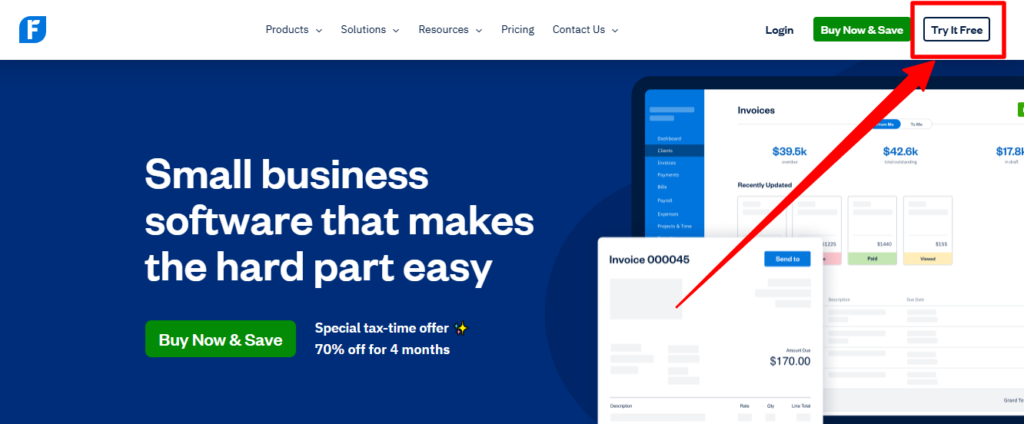
Step 1: Click “Get Offer” or start with “Try It Free” for the 30-day trial.
Step 2: Select your preferred plan (Lite, Plus, or Premium).
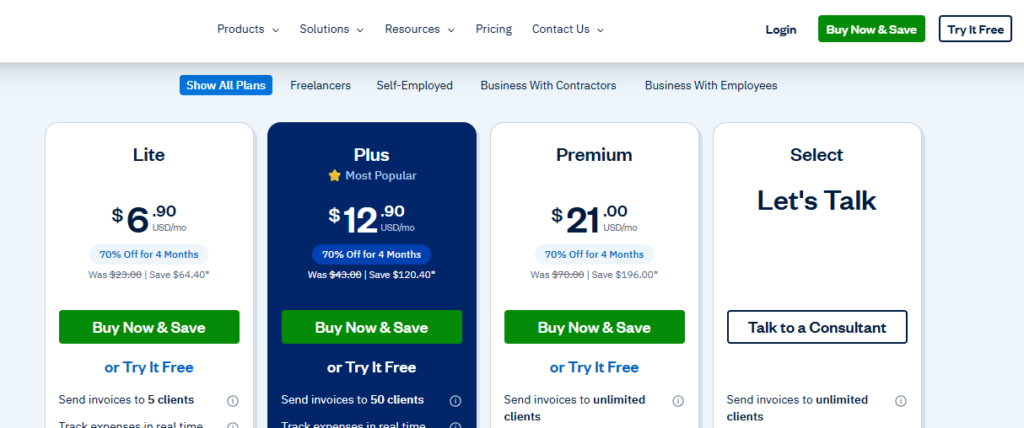
Step 3: Continue with the free trial (no credit card) or choose to upgrade directly to claim the discount.
Step 4: Enter your account and payment details at checkout, and make sure the 90% discount is applied before completing payment.
That’s it! You’ve successfully activated your FreshBooks plan and secured the maximum discount on your subscription.
What Is FreshBooks? Is Any Plan Worth It?
FreshBooks is a cloud-based accounting and invoicing platform founded in 2003 in Canada
It was built for freelancers and service-based businesses, focusing on simplicity so users can manage finances without accounting knowledge.
It is best known for easy invoicing, time tracking, client management, mobile access, and strong customer support.
However, it has limited reporting, no inventory features, and additional costs for extra users, making it better suited for small to mid-sized service businesses.
Conclusion: Which FreshBooks Plan Should You Choose?
Choosing the right FreshBooks plan depends mainly on how many clients you bill. Lite works for up to 5 clients, plus fits growing businesses of up to 50 clients with advanced accounting features.
Premium is ideal for 50+ clients and profitability tracking, and select suits high-volume businesses needing custom pricing and dedicated support.
Start with the 30-day free trial to test it with real data, or use the 90% discount if you’re ready to commit.
FAQs On FreshBooks Plans
Which FreshBooks Plan Is Best For Freelancers?
The lite plan ($23/mo) works for freelancers with 5 or fewer clients who only need basic invoicing and expense tracking. However, most freelancers are better served by the plus plan ($43/mo), which adds double-entry accounting, bank reconciliation, recurring invoices, and accountant access features that become essential once you start filing taxes or working with a bookkeeper.
Does FreshBooks Have A Free Plan?
No, FreshBooks does not offer a permanent free plan. However, all Lite, Plus, and Premium plans include a 30-day free trial with no credit card required, giving you full access to evaluate the platform before committing. FreshBooks also offers a 30-day money-back guarantee on paid plans if you’re not satisfied after purchase.
Can I Switch Between FreshBooks Plans?
Yes, you can upgrade or downgrade between FreshBooks plans at any time without losing data. Upgrades take effect immediately. Downgrades take effect at the start of your next billing cycle. FreshBooks does not require long-term contracts on monthly plans, so you can also cancel at any time.


